- Join Our Company
- Email: sanjay@pjnetworks.com
- Phone: +91-9818361787


“Do we actually need an OTP login on the reception Wi-Fi, or is a password on a card at the front desk enough?”
We hear some version of that question every few weeks, usually from an IT head who has just been asked by an auditor, or by a visitor’s IT team, how guests get online. It sounds like a small question. It isn’t, because guest Wi-Fi security in India sits at the meeting point of three things: your firewall design, an old telecom direction most people have never read, and a privacy law that now applies to the phone numbers you collect at the portal.
This is the order in which our network team builds or fixes a guest network for a mid-sized Indian office, plant or clinic.
The short answer: give guests their own SSID and VLAN that can reach the internet and nothing else, authenticate each visitor with a captive portal (SMS OTP is the common choice), isolate clients from each other, limit bandwidth per user, and send the portal and firewall logs to the same place as your other logs. A shared password on a card does none of this.
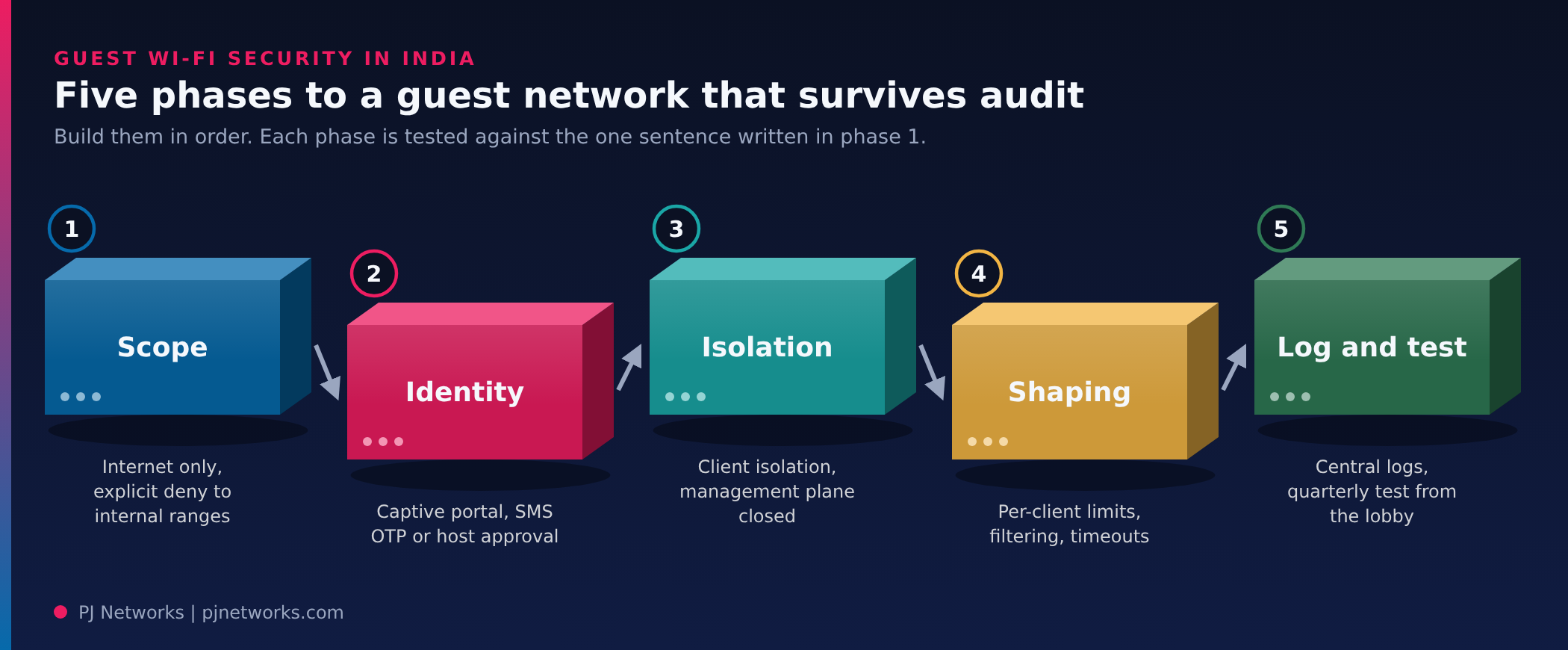
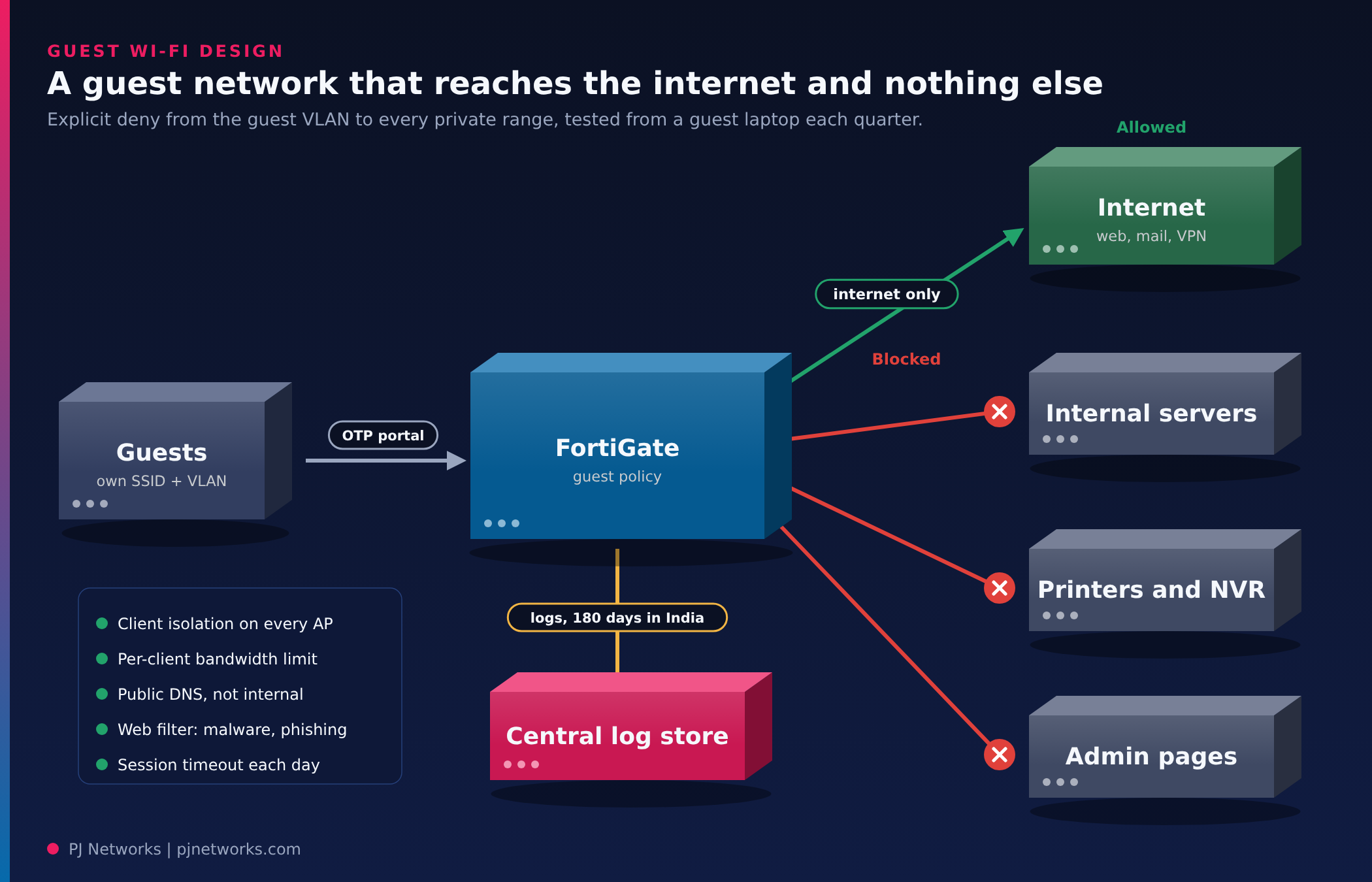
Start with a written sentence, not a config: “The guest network reaches the public internet over ports X and Y, and nothing on our internal network.” Every later decision gets tested against it.
On a FortiGate with FortiAP, that usually means a dedicated guest SSID mapped to its own VLAN or tunnel interface, a firewall policy from that interface to the WAN only, and an explicit deny from the guest interface to every internal subnet, including the private address ranges you don’t use today. That last part matters. We often find guest VLANs that were “isolated” until someone added a printer subnet or a CCTV NVR range two years later and the any-to-any rule above it quietly covered the new range.
Two shortcuts we’d avoid. Don’t put guests on the same SSID as staff with a different password. And don’t let the guest network use your internal DNS servers; give it public resolvers or a DNS filtering service, so a visitor’s laptop can’t enumerate internal hostnames.
A shared password tells you that someone who visited reception at some point connected. If a guest device is later linked to abuse, that’s all you’ll be able to say.
The Department of Telecommunications addressed this years ago. Its February 2009 direction to internet service providers requires Wi-Fi to be registered against central authentication, and for public hotspots it describes issuing temporary logins either against a copy of photo ID or by SMS to the user’s mobile number, with that identity kept for one year. The direction is addressed to ISPs, so how exactly it applies to a private office’s visitor network is a question for your legal team. In practice, most enterprises we work with follow its logic anyway because it answers the auditor’s question cleanly.
So the common design is a captive portal on the FortiGate or wireless controller, with SMS OTP to the visitor’s mobile number and a session time limit. For a factory or hospital with long-stay visitors, sponsored access (a staff member approves the guest) can work better than OTP alone.
Once you collect mobile numbers at a portal, the Digital Personal Data Protection Act applies to them. Show a short notice on the portal saying why you collect the number and how long you keep it, use it for nothing else (no marketing SMS from the Wi-Fi list unless you ask separately), and set a retention period that someone has actually signed off. Our DPDP compliance team sees guest Wi-Fi registers left out of data inventories more often than you’d expect.
Network isolation stops guests reaching you. Client isolation stops them reaching each other, which matters in a waiting room or training hall where one infected laptop can scan everything nearby. Turn on intra-SSID blocking on the access points, and check that it also holds across APs on the same VLAN.
Then check the management plane. The guest VLAN must not reach the FortiGate’s admin interface, the AP management addresses or the switch web consoles. We test this by plugging a laptop into the guest SSID and trying to open each one. It takes ten minutes and finds something surprisingly often. Our FortiGate hardening checklist covers the admin-access side in more detail.
What about encryption on an open guest network? Where your APs and visitor devices support it, WPA3 enhanced open (OWE) encrypts each client’s traffic without a shared password, and pairs well with a captive portal. Older device fleets may force you back to an open SSID with the portal doing the work. That’s acceptable if isolation is solid.
A branch running on one broadband connection can be brought to its knees by a single visitor syncing a phone backup. Set a per-client bandwidth limit on the guest SSID and a total cap on the guest interface, so staff traffic and the ERP connection keep priority. If you run SD-WAN across branches, steer guest traffic to the cheaper link and never across the MPLS or VPN path to head office.
Apply web and DNS filtering for the obvious categories: malware, phishing, adult content and newly registered domains. Resist the urge to block everything else. Guests who can’t reach their own company’s VPN or video calls start hotspotting from their phones, and then you have no visibility at all.
Session timeouts finish the job. A visitor login that lasts the working day, then expires, is enough for most offices.
Here’s the short list we use when reviewing an existing setup. If you can tick every line, the guest network is rarely the finding.
| Check | What good looks like | Who signs off |
|---|---|---|
| Separate SSID and VLAN | Guest traffic on its own interface with its own firewall policy | Network lead |
| Internal access blocked | Explicit deny from guest to all private ranges, tested from a guest laptop | Network lead |
| Per-visitor identity | Captive portal with SMS OTP or sponsor approval, no shared password | IT head |
| Privacy notice and retention | Portal notice in place, retention period approved, list not reused | Data protection lead |
| Client isolation | Guests can’t see each other, across all APs | Wireless engineer |
| Management plane closed | No admin page reachable from the guest SSID | Network lead |
| Bandwidth and filtering | Per-client limits, guest cap, security categories filtered | IT head |
| Logs centralised | Portal and firewall logs sent off the device and retained per policy | SOC or IT security |
Portal logins mean little if the records live only on the access controller and roll off when its disk fills. Send authentication events and guest firewall sessions to your central log store with the rest of your estate. CERT-In’s 2022 directions require organisations to maintain logs of their ICT systems for a rolling 180 days within India, and we’d treat the guest network as part of that estate. We covered how to size that in our post on firewall log retention in India.
Then put a quarterly test in the calendar: connect to the guest SSID, try to reach an internal server, a printer, the NVR and the firewall admin page, and check that a test login shows up in the logs with the right phone number and time. Configuration drift is the real risk here. Nobody breaks a guest network on purpose.
Every phase above can be built by hand on a FortiGate. The trouble starts at the second site, the second firewall brand, or the first audit that asks for consent records. That’s why we deploy PrahiX Guest, the guest Wi-Fi application in the PrahiX Ora family. PrahiX Tech Pvt Ltd builds Ora, and PJ Networks is its primary field deployment and operations partner, so this is the product we install, connect to your firewalls and run for you.
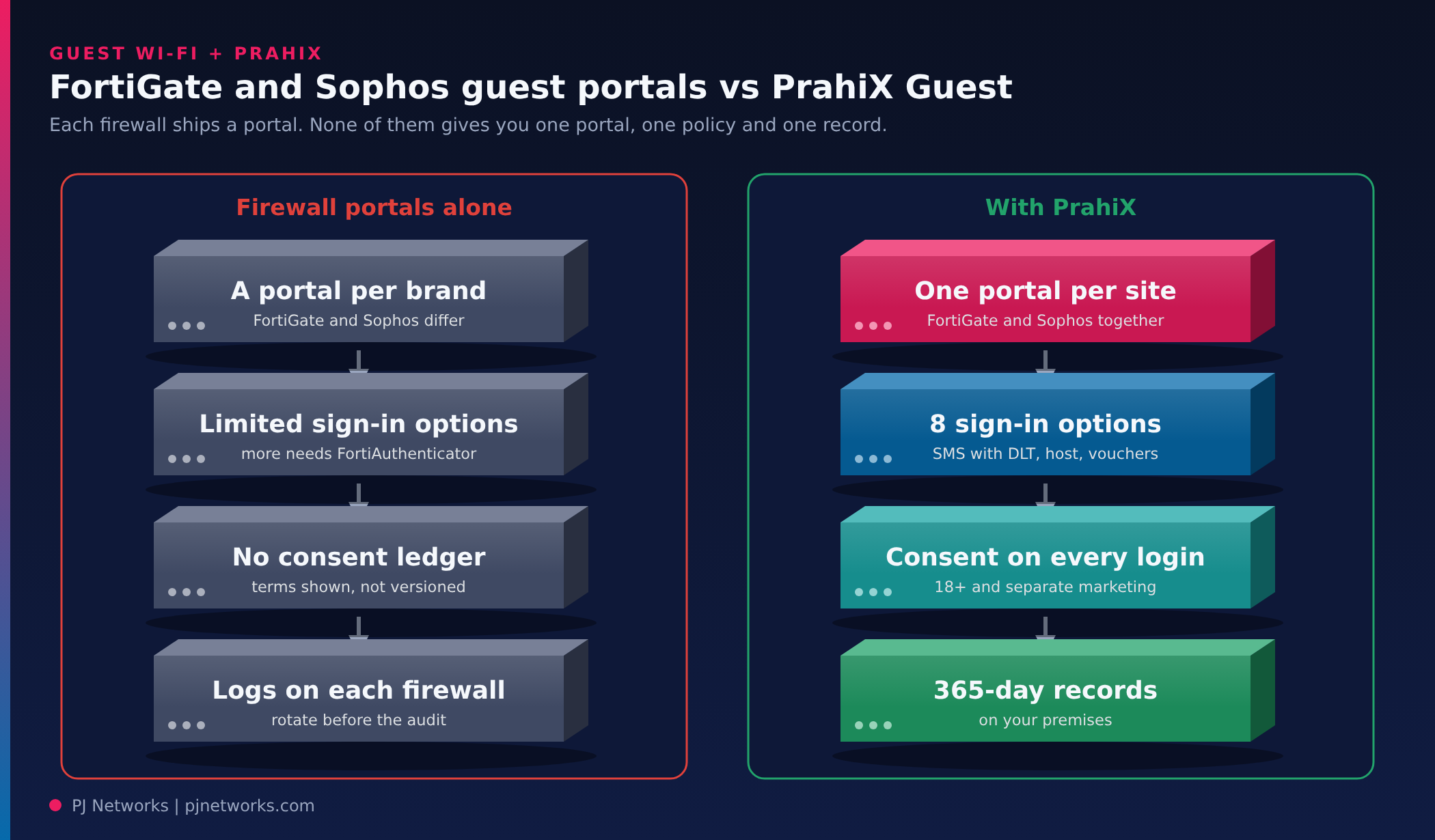
| With the firewall’s own portal | With PrahiX Guest |
|---|---|
| FortiGate and Sophos each have their own portal, settings and records, so a mixed estate runs two guest systems | One branded portal per site, serving FortiGate and Sophos guests from the same appliance |
| A disclaimer page and a small set of sign-in options; on Fortinet, richer guest workflows usually mean adding FortiAuthenticator | Eight options, including SMS with India DLT fields, host approval, vouchers and sponsor accounts |
| Terms shown, but acceptance not versioned or stored as consent | Versioned consent on every login, an 18+ declaration and separate marketing consent |
| Ending a guest session means finding them on the right firewall | Sessions end automatically at expiry, quota or suspension, through RADIUS or the vendor’s API |
| Guest logs on each firewall or log server, retained as space allows | 365-day login records by default, never under 180, on your premises |
This gap isn’t specific to Fortinet. Firewall captive portals are built to identify users, and endpoint vendors don’t cover guest networks at all.
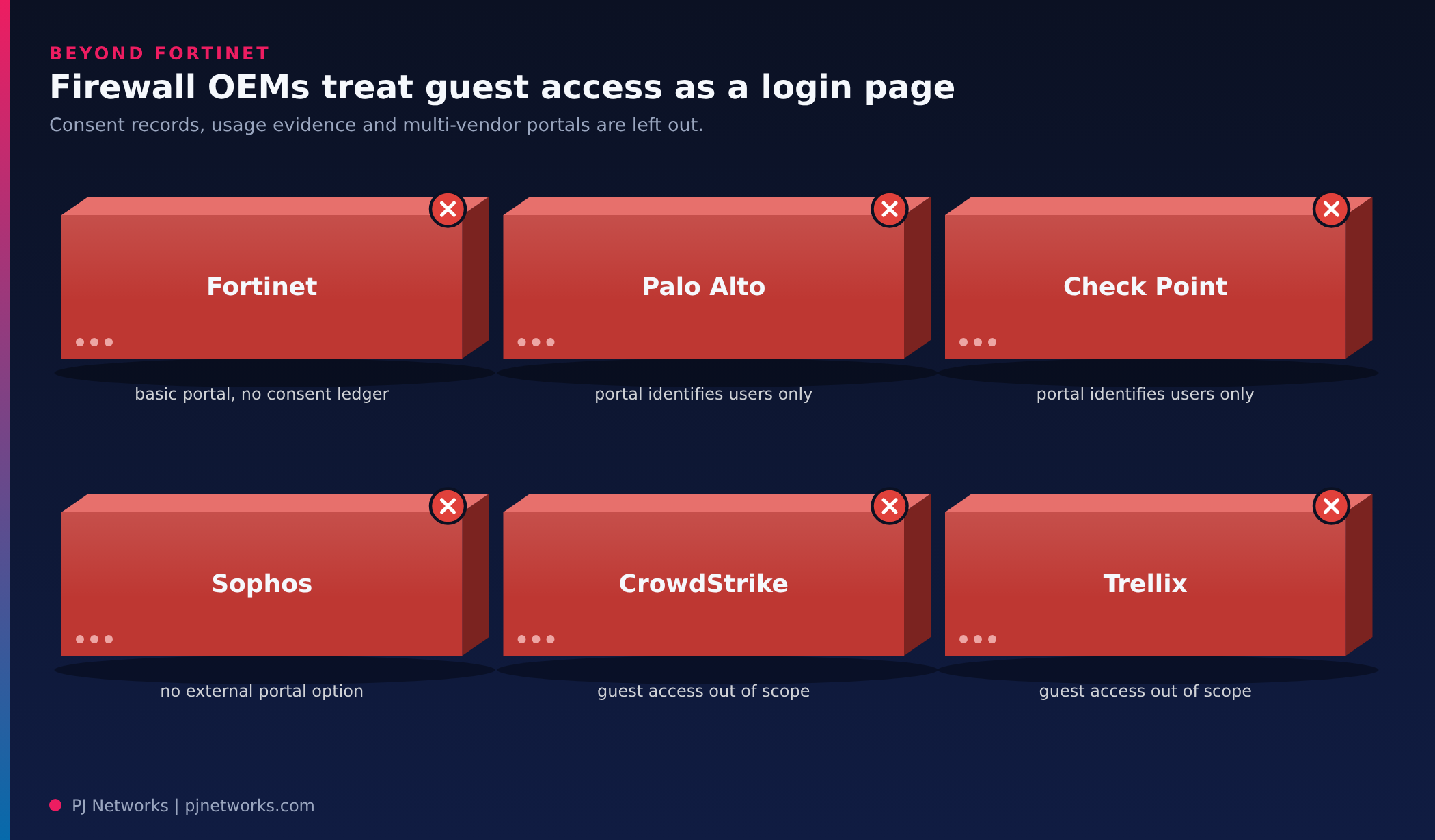
| OEM | What you get, and where it stops |
|---|---|
| Fortinet | The FortiGate captive portal is basic; richer guest management needs FortiAuthenticator, a separate product, and there’s no consent ledger |
| Palo Alto Networks | The Authentication Portal identifies users for policy; guest self-registration and consent records sit elsewhere |
| Check Point | The Identity Awareness captive portal identifies users; consent records and guest usage reporting sit elsewhere |
| Sophos | SFOS has no external portal option, and guest sessions lack byte counters and MAC addresses |
| CrowdStrike | Endpoint security; guest network access is outside its scope |
| Trellix | Endpoint and data security; guest network access is outside its scope |
| PrahiX | One enhanced guest portal across FortiGate and Sophos firewalls, with consent records and per-session usage evidence kept for audits. |
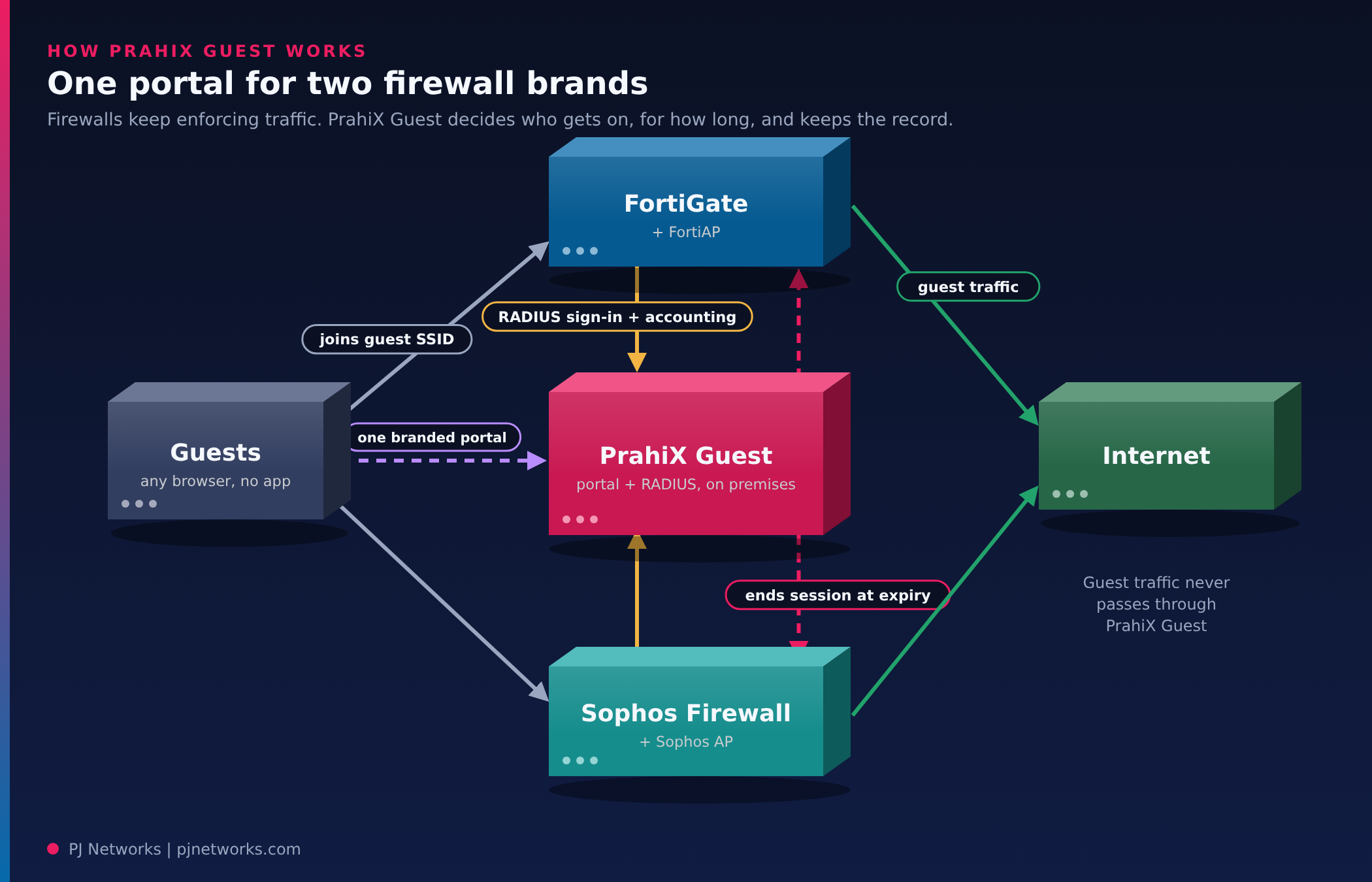
PrahiX Guest is a single virtual appliance on your premises that combines a branded captive portal with a RADIUS server. Your firewalls keep enforcing traffic. The appliance decides who gets on, for how long, and keeps the record.
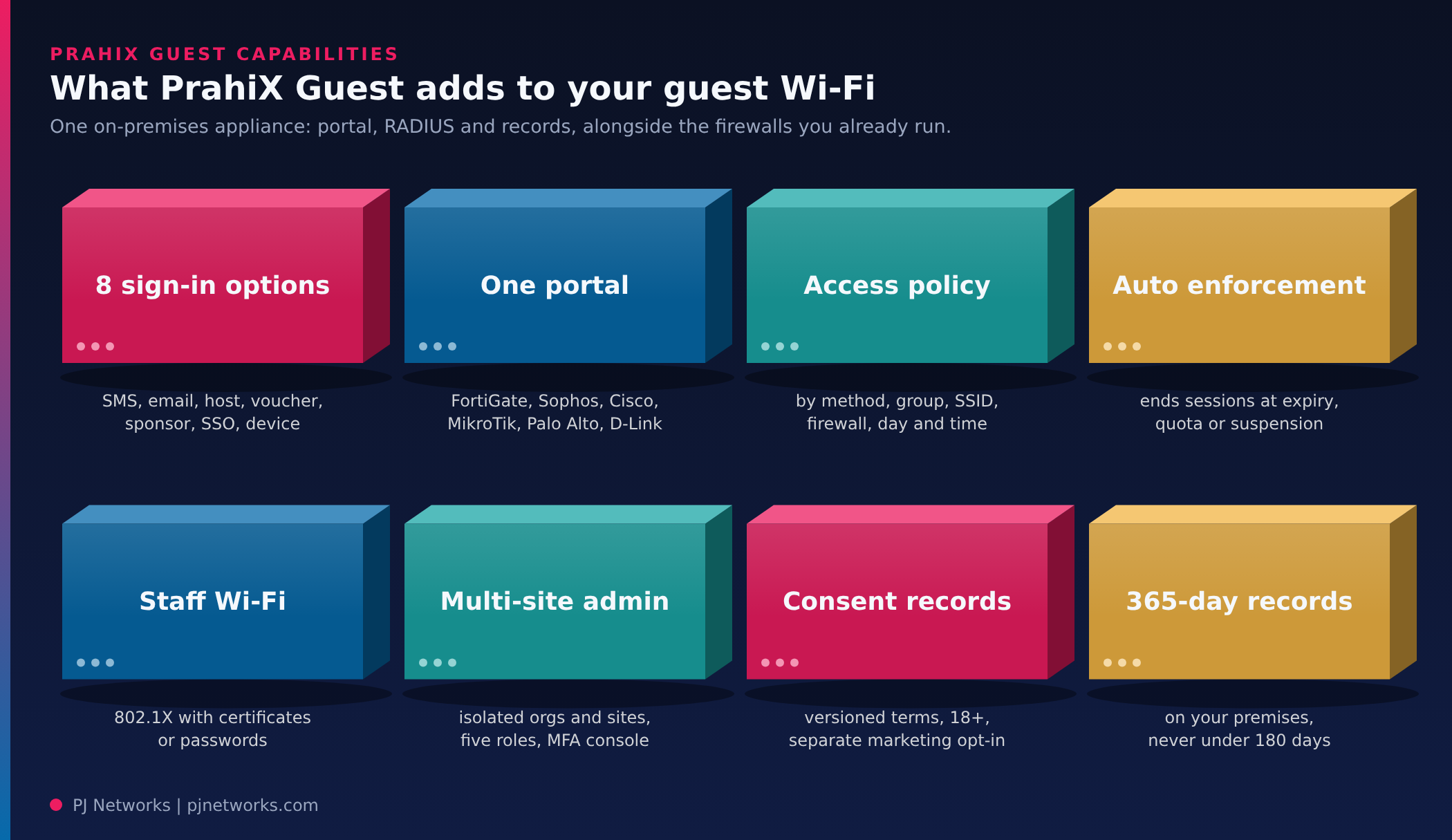
Each site picks the methods it offers. SMS codes (six digits, valid five minutes) work with any HTTP SMS gateway and include presets for Indian providers such as MSG91, Gupshup, Kaleyra, Exotel and Route Mobile, plus the DLT fields operators require. Email codes suit visitors without an Indian number. “Ask a host” lets a visitor pick their contact, who approves from an email link without a console login. Printed vouchers cover training rooms and events, from a minute to a year, with a set number of devices each. Sponsors can create accounts lasting an hour to thirty days. On FortiGate, guests can also sign in with Google, Microsoft or another OpenID Connect provider, and printers or TVs without a browser can be registered by MAC address.
Site access policies are ordered rules by sign-in method, guest group, SSID, firewall, weekday and time of day. Usage profiles set session, idle and total time, data quota, devices per guest and, where the firewall supports it, speed. When a session reaches its time, quota or is suspended, the appliance ends it on the firewall itself, through RADIUS Disconnect on FortiGate or the vendor’s API on Sophos. Sessions that stop reporting are marked stale and closed.
The same branded portal, with your logo, terms and privacy notice, serves FortiGate and Sophos guests at the same site, and runs in any browser with no app. Adapters for Cisco Catalyst 9800, MikroTik, Palo Alto and D-Link controllers are built from vendor documentation and awaiting hardware trials, so treat those as pilots.
Every login records which version of your terms and privacy notice the guest accepted, with an 18+ declaration and marketing consent asked separately, never pre-ticked. Login records are kept for 365 days by default and can’t be set below 180, on your own premises. Reports cover logins per day, sessions by site and data usage, with CSV export, and an append-only audit log tracks every administrator action. None of this makes you compliant on its own. It gives your auditor evidence rather than a screenshot.
The appliance can also be the RADIUS server for staff Wi-Fi using 802.1X, with certificates, passwords or both. One appliance can host several organisations and sites, each isolated, with five roles from owner to auditor, and console sign-in through TOTP, passkeys, SSO or Active Directory with a second factor. Backups are encrypted and can be copied off the box.
We’ve written up how PrahiX Guest serves FortiGate and Sophos from one portal, including what is proven on real hardware so far.
The guest network doesn’t live alone. Ora’s NMS watches the access points, switches, firewalls and WAN or SD-WAN links it rides on, with LLDP and CDP topology, path tracing, ML-based anomaly detection and auto-healing, so a guest SSID mapped to the wrong VLAN gets caught. The SIEM correlates portal and firewall events against MITRE ATT&CK and keeps hot, cold and archive tiers for CERT-In’s 180-day in-country retention. SOAR playbooks can push a blocklist to FortiGate when a guest device starts scanning, which keeps the six-hour reporting window realistic, and video surveillance (VMS) brings ONVIF, Hikvision and Dahua cameras at reception into the same view.
It encrypts traffic over the air, but a password shared on a card identifies nobody and tends to stay the same for years. Former visitors and neighbours can keep using it. If you want accountability, add a captive portal with per-visitor login on top of, or instead of, the shared key.
CERT-In’s 2022 directions ask organisations to keep logs of their ICT systems for 180 days in India, and a guest network running through your firewall is hard to argue out of scope. Keep the portal login records and firewall sessions together so you can link a session to a visitor. Ask counsel about your exact obligations.
Yes. FortiGate can host a captive portal on the guest interface, with FortiAP access points managed from the same box, and it supports guest user management with SMS-based credentials through a configured SMS service. Larger estates sometimes move portal duty to a dedicated NAC or guest management platform for custom workflows and reporting.
Usually not. Backhauling guest traffic over VPN or MPLS to head office uses expensive bandwidth for traffic you don’t care about. Break it out locally at each branch, with the same policy template pushed to every site and logs sent centrally.
Take a laptop to reception, join the guest SSID and try to open your firewall’s admin page, a shared printer and one internal server. If any of them respond, you’ve found your first fix, and it’s usually a single policy change.
If you’d rather have someone else run that review across your sites, our enterprise networking team can check the guest design, captive portal and logging in one visit and leave you a short list of changes.