- Join Our Company
- Email: sanjay@pjnetworks.com
- Phone: +91-9818361787


On 17 November, a phone on the Sophos guest network in our Mayapuri office opened a browser, landed on a sign-in page, entered a code and got online. Nothing unusual there, except that it was the same portal guests on the office FortiGate had been using since 11 November. Two firewall brands, one guest page, one record of who logged in.
That’s the problem we set out to solve with PrahiX Guest, and it’s a more common one than it sounds. Running guest Wi-Fi across FortiGate and Sophos, or across any two firewall brands, usually means two portals, two sets of settings and two half-complete lists of visitors.
This post explains how the approach works, what each firewall can and can’t do with it, and where the gaps still are.
The short answer: move the guest-facing work off the firewalls. A single on-premises appliance hosts the branded portal, runs every sign-in method and answers the firewalls over RADIUS. FortiGate and Sophos each keep enforcing traffic, but guests see one page, consent is recorded the same way, and every login lands in one place for at least 180 days.
Very few Indian organisations chose to run two firewall brands. It happens anyway. A branch was bought on a different year’s budget, a plant came with its own kit after an acquisition, or a migration from one vendor to another is taking twelve months instead of three.
Each brand has its own idea of a guest portal. FortiGate has one, Sophos has a different one, and they don’t share sign-in methods, branding or records. Reception staff learn two consoles. Visitors at two buildings of the same campus see two different pages. And when an auditor asks who was on the guest network on a particular afternoon, someone has to pull logs from two systems that store them in different shapes, assuming those logs haven’t already rotated away.
There’s also a gap neither firewall portal fills well on its own. Under the Digital Personal Data Protection Act, you want a record of what each guest agreed to and which version of your terms they saw. A firewall portal shows a page. It doesn’t version the terms or keep the acceptance.
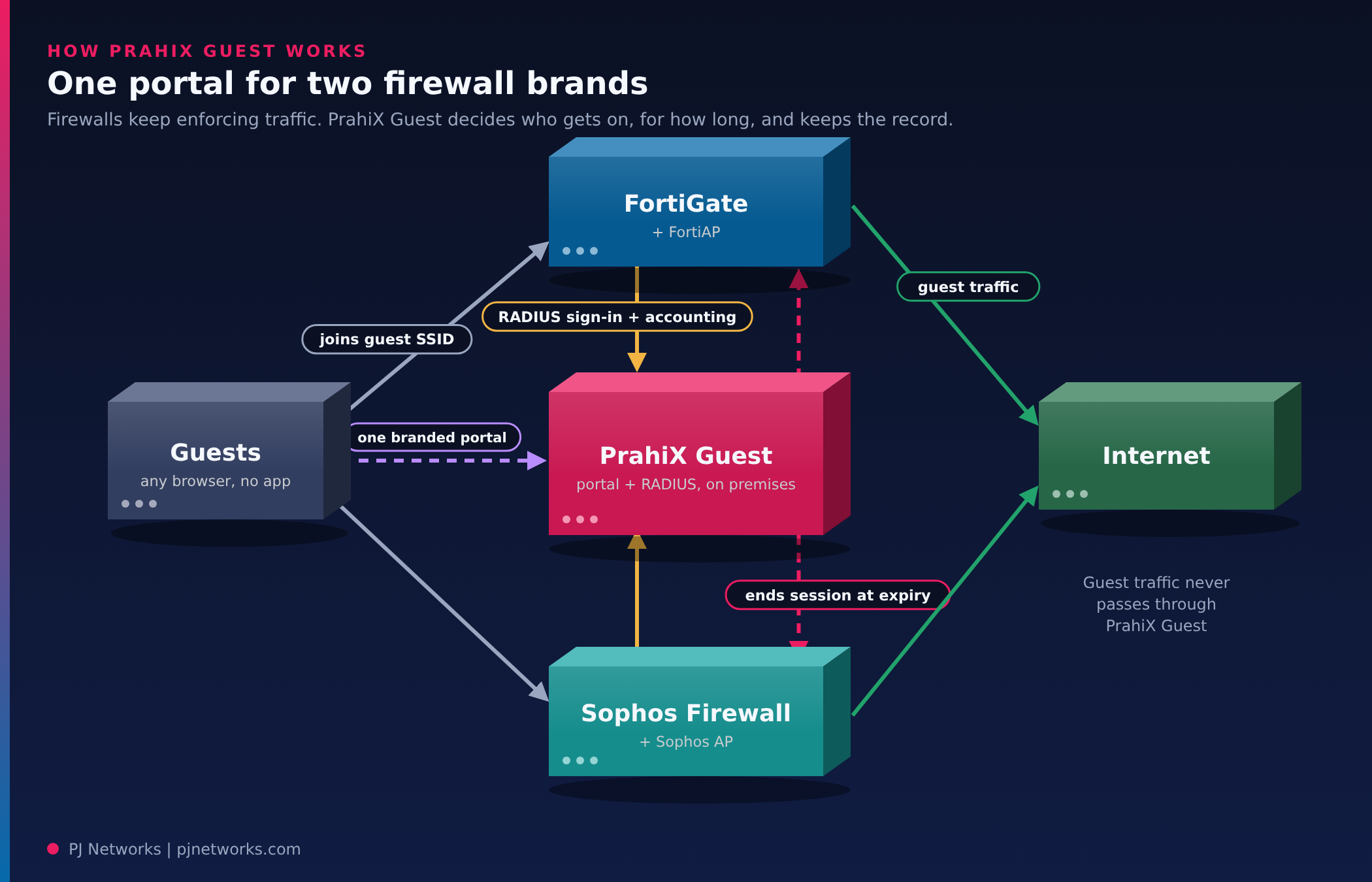
PrahiX Guest sits beside the firewalls, not in the traffic path. Guest traffic always flows through the guest’s own firewall; the appliance only sees portal pages and RADIUS messages. The firewall stays in charge of the network. The appliance decides who gets on, for how long, and keeps the record.
A sign-in works in three exchanges. The firewall redirects an unknown guest to the portal for that site. The guest signs in, and the portal hands the browser back to the firewall with a one-time credential, valid for 120 seconds and tied to that firewall and that device. The firewall checks the credential with the appliance over RADIUS, opens the session and reports accounting. When time runs out, a quota is reached or an administrator suspends the guest, the appliance ends the session on the firewall.
Each firewall brand has its own adapter inside the appliance. The adapter knows how that vendor redirects, how it expects the hand-off, which RADIUS attributes it honours and how it ends a session. Adding a vendor means adding an adapter. The portal, the sign-in methods and the records stay the same.
Here’s where we’d be straight with you: the two firewalls don’t behave the same, and the differences come from what each one reports over RADIUS. We tested both on real hardware (a FortiGate 60E on FortiOS 7.4 with FortiAP, and Sophos Firewall on SFOS 19.5 with an AP15C) and wrote down what we saw.
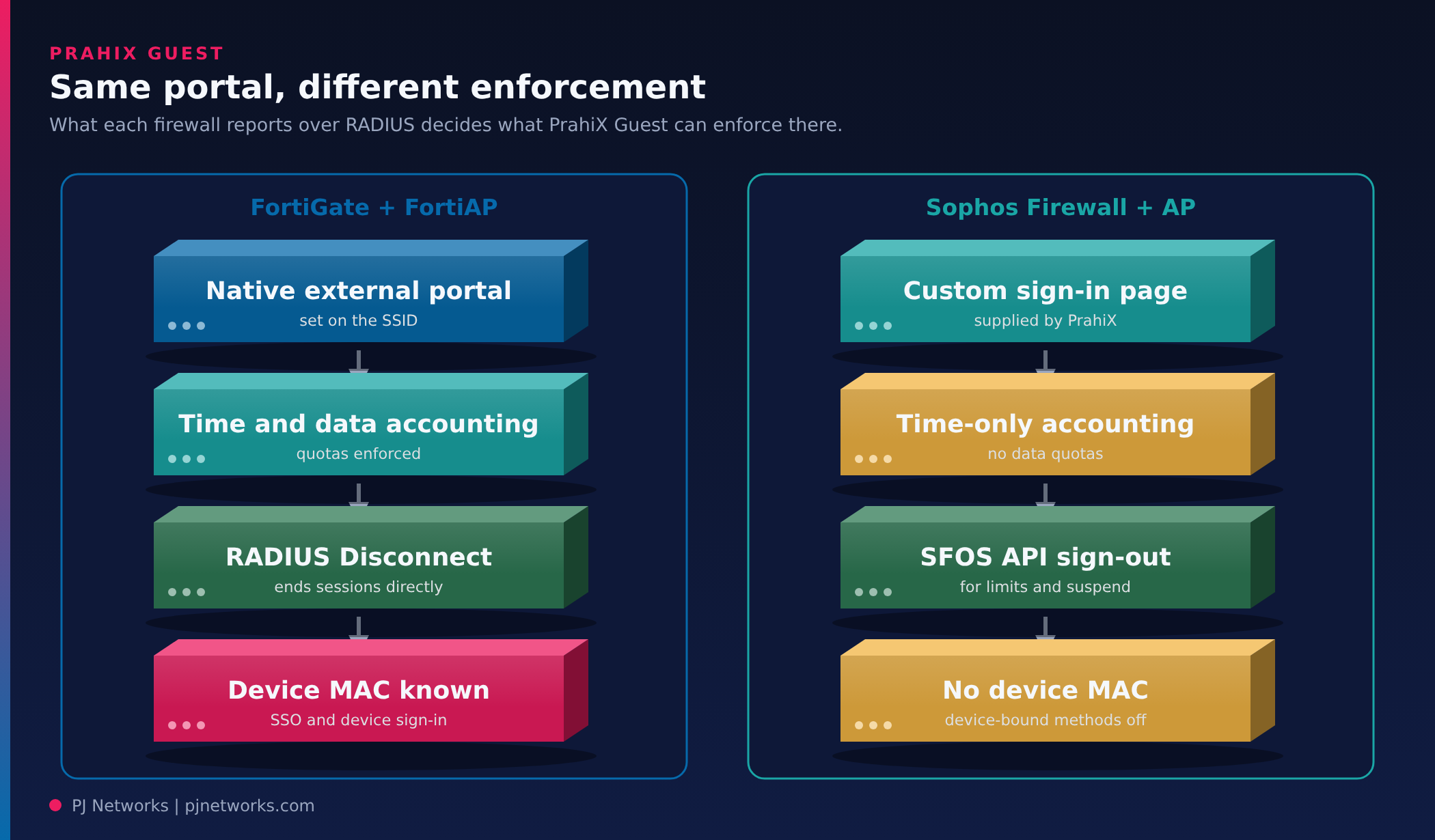
| Function | FortiGate | Sophos Firewall |
|---|---|---|
| Sending guests to the portal | Native external captive portal setting on the SSID | No external portal setting; PrahiX supplies a custom sign-in page that passes guests to the portal and back |
| Sign-in check | RADIUS | RADIUS |
| Accounting | Time and data | Time only, as SFOS sends no byte counters |
| Time limit per sign-in | Applied by FortiOS from the RADIUS reply | Ignored by SFOS; PrahiX signs the guest out through the SFOS API |
| Data quota | Checked at each accounting update | Not possible without byte counters |
| Suspend or disconnect | RADIUS Disconnect | Through the SFOS API |
| Device MAC address | Known | Not sent, so device-bound methods aren’t offered |
| Per-guest speed limits | On some models, with dynamic shaping | Per firewall rule, the same for all guests |
This gap isn’t specific to Fortinet. Firewall captive portals are built to identify users, and endpoint vendors don’t cover guest networks at all.
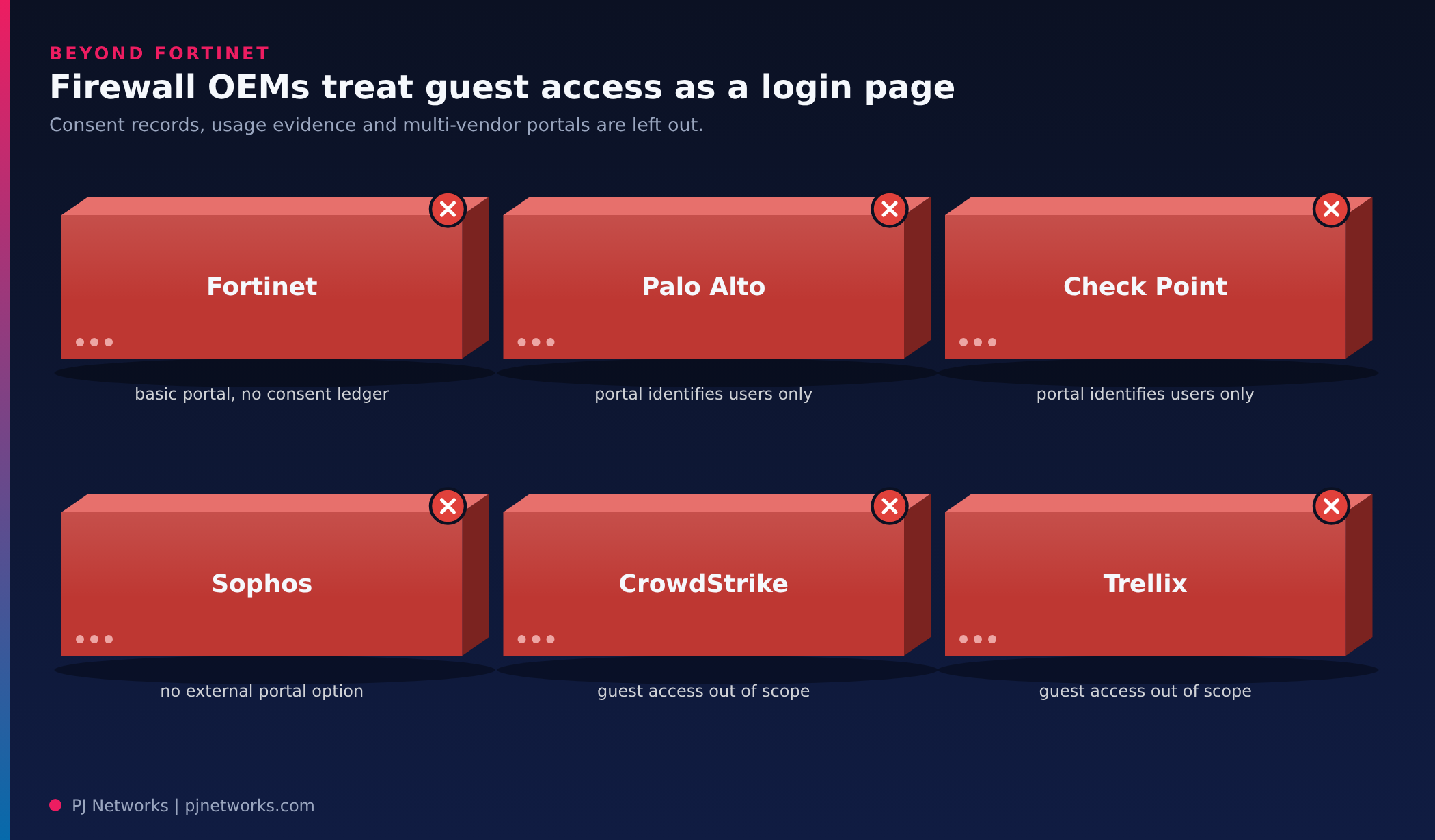
| OEM | What you get, and where it stops |
|---|---|
| Fortinet | The FortiGate captive portal is basic; richer guest management needs FortiAuthenticator, a separate product, and there’s no consent ledger |
| Palo Alto Networks | The Authentication Portal identifies users for policy; guest self-registration and consent records sit elsewhere |
| Check Point | The Identity Awareness captive portal identifies users; consent records and guest usage reporting sit elsewhere |
| Sophos | SFOS has no external portal option, and guest sessions lack byte counters and MAC addresses |
| CrowdStrike | Endpoint security; guest network access is outside its scope |
| Trellix | Endpoint and data security; guest network access is outside its scope |
| PrahiX | One enhanced guest portal across FortiGate and Sophos firewalls, with consent records and per-session usage evidence kept for audits. |
In practice, FortiGate sites get the full feature set, and Sophos sites get the same portal, sign-in methods and records with time-based control instead of data quotas. For most offices that’s a fair trade. For a hostel or a hospital ward where data caps matter, it’s worth knowing before you plan.
The portal offers the same choices on both firewalls, set per site. The ones we see used most:
FortiGate sites can also offer sign-in with Google, Microsoft or another OpenID Connect provider, and register browser-less devices such as smart TVs by MAC address. Those two need the device’s MAC, which is why they aren’t offered on Sophos.
The same appliance can also act as the RADIUS server for staff Wi-Fi using 802.1X, so staff and guests are handled in one place. We’ve seen staff PEAP sign-in work through the FortiGate; certificate-based staff sign-in is built but not yet tried on real devices.

Every login records which version of your terms and privacy notice the guest accepted, along with an 18+ declaration. Marketing consent is asked separately and is never pre-ticked. That doesn’t make anyone compliant on its own, but it gives your data protection lead evidence instead of a screenshot of a portal page.
Login records are kept for 365 days by default, and the setting can’t go below 180, in line with the log retention period in CERT-In‘s 2022 directions. Because the appliance runs as a virtual machine on your own premises, those records stay in India and under your control. Our post on firewall log retention in India explains why that 180-day floor matters when an incident or audit request arrives months later.
PrahiX Guest is the guest Wi-Fi application in the PrahiX Ora family, built by PrahiX Tech Pvt Ltd. PJ Networks is the primary field deployment and operations partner, so this is a product we install, configure against your firewalls and support, not one we built. The appliance is licensed through Ora and can run on its own at a single site.
For clients already on the wider PrahiX Ora platform, guest Wi-Fi stops being an island. The SIEM pillar takes in logs from many sources, correlates them against MITRE ATT&CK, rebuilds incidents as graph-based storylines and keeps data in hot, cold and archive tiers, which supports the 180-day in-country retention CERT-In asks for. The NMS pillar watches the access points, switches, firewalls and WAN or SD-WAN links that guest traffic rides on, with LLDP and CDP topology discovery, path tracing, ML-based anomaly detection and auto-healing policies, which matters on multi-vendor estates where each box has its own console.
SOAR playbooks with pre-built connectors can act on what they find, including pushing blocklists to FortiGate, and that kind of automation keeps CERT-In’s six-hour reporting window realistic. At reception desks, lobbies and shop floors, video surveillance (VMS) adds ONVIF, Hikvision and Dahua cameras with video analytics to the same operations view.
The practical gain is one trail. A guest login, the firewall session it opened and any alert that session later raised can be read together, instead of being stitched from three consoles after the fact. On a multi-site estate with mixed firewalls, that is usually the difference between answering an auditor in an hour and answering in a week.
FortiGate and Sophos both ship a captive portal, and for a single office with one firewall brand it may be enough. It stops being enough at the second brand, the first audit that asks for consent records, or the first visitor who needs a host’s approval rather than a password.
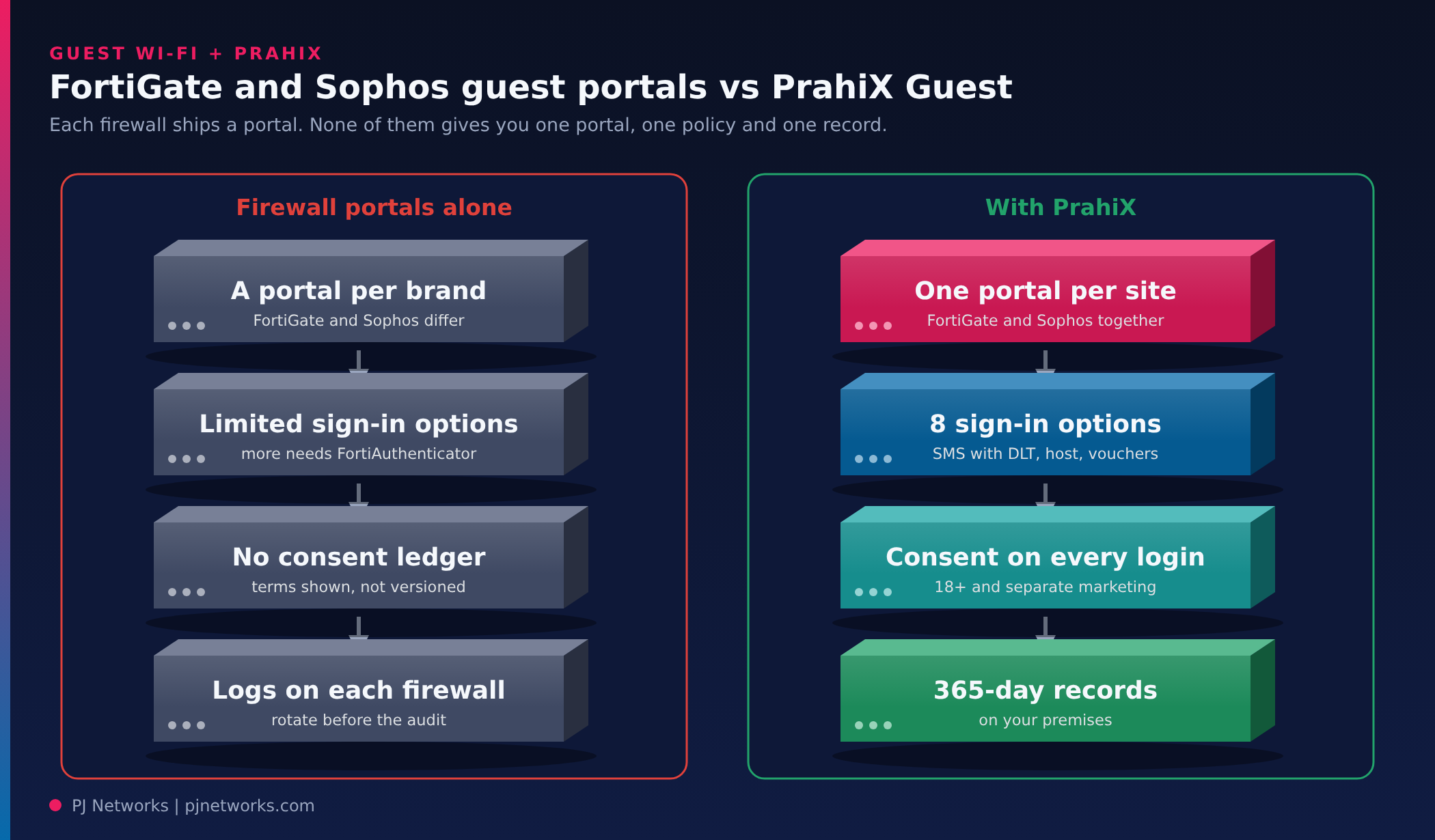
On Fortinet, sponsor approval and richer guest self-registration usually mean adding FortiAuthenticator, a separate product and licence. Neither firewall’s portal keeps a versioned record of what each guest accepted, and guest logs live on each firewall or log server for as long as space allows. PrahiX Guest replaces the page and the sign-in logic while the firewall keeps enforcing traffic: one portal per site across both brands, eight sign-in options, consent recorded on every login and 365-day records on your premises.
The firewall comparison above covers the plumbing. Day to day, these are the parts our NOC team and your reception desk will actually use.
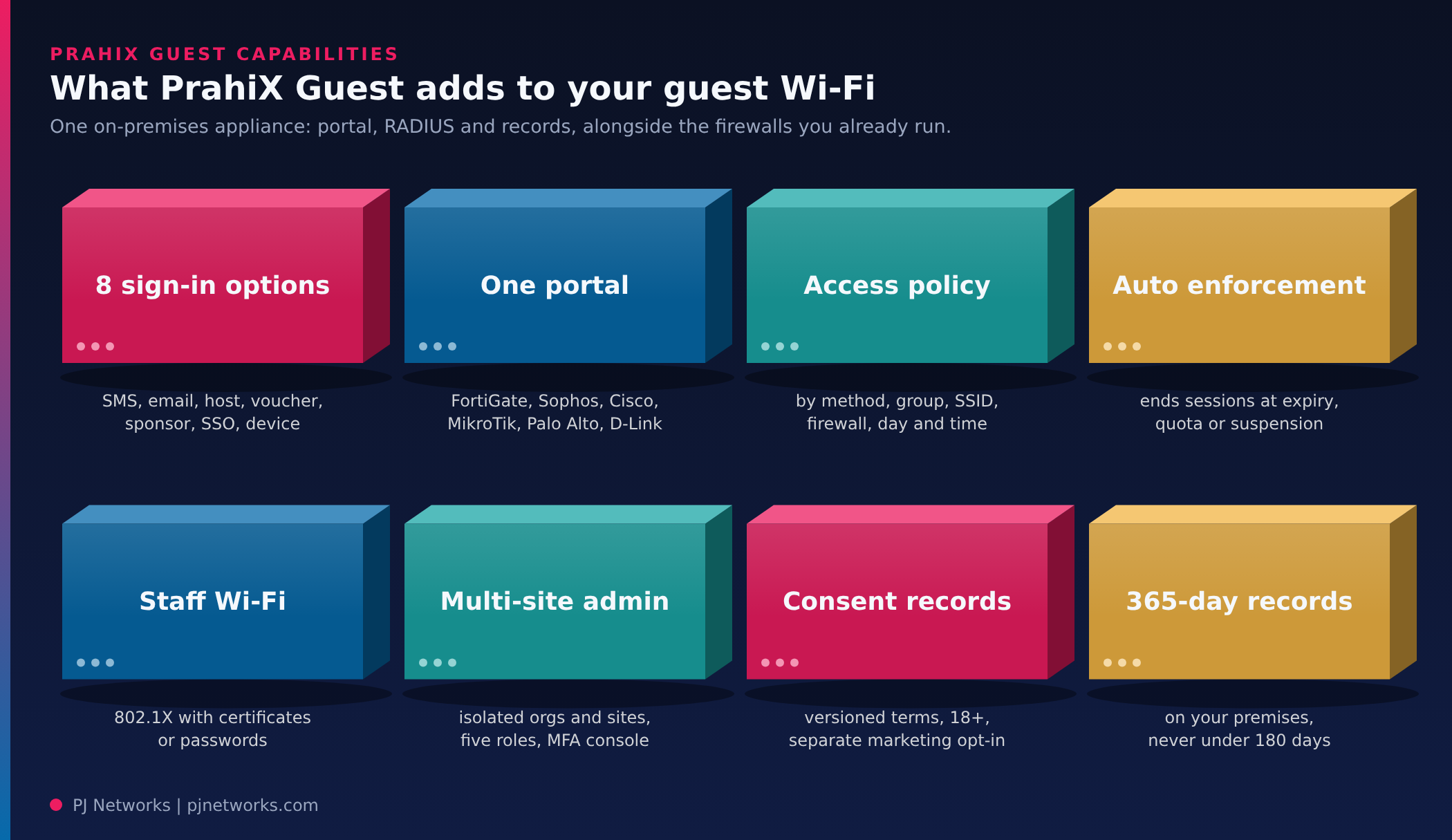
Site access policies are ordered rules that match on sign-in method, guest group, SSID, firewall, weekday and time of day. A training room can allow vouchers only on weekdays; the lobby can allow SMS any time. Usage profiles then set session, idle and total time, data quota, devices per guest and speed where the firewall accepts it, and authorization profiles can drop a guest into a FortiGate user group for its own firewall policy.
Live sessions come from RADIUS accounting on both firewalls. The appliance ends sessions automatically at expiry, at quota, on suspension or when a voucher is revoked, using whichever method that vendor supports, and closes sessions that stop reporting. Reception staff can see who is online and end a session without logging in to a firewall.
One appliance can host several organisations and sites, each isolated from the others. Five roles (appliance owner, super admin, site admin, sponsor and auditor) keep receptionists away from settings and give auditors read-only access. Console sign-in supports TOTP, passkeys, OpenID Connect, SAML, or LDAP and Active Directory with a local second factor. Each firewall gets a setup sheet with that site’s own values and a RADIUS health view, and shared secrets are encrypted and never displayed.
Reports cover logins per day, sessions by site and data usage over up to a year, with CSV export, and an append-only audit log records every administrator and system action. One-time logins are stored as keyed hashes, hand-offs go only to sign-in addresses on each firewall’s allowlist, and rate limits apply per address, phone number, approver and site. Backups are encrypted, a restore can be undone within 24 hours, and scheduled copies can go off the box to write-once SFTP or S3-compatible storage.
Everything described here is built and tested end to end on the appliance. On real hardware, some parts are still waiting their turn, and we’d rather you hear it from us:
Cisco Catalyst 9800, MikroTik, Palo Alto and D-Link controllers are built against each vendor’s documentation but not yet tested on their hardware. If you run one of those, treat the first site as a pilot.
A site needs an Ubuntu virtual machine (we recommend 8 vCPU, 16 GB RAM and 120 GB disk), a hostname with a certificate guest devices trust, an SMTP relay, an SMS gateway if you want SMS codes, and a supported firewall with RADIUS enabled. Guests need nothing but a browser.
No. The appliance only serves the portal pages and answers RADIUS. Guest traffic goes through the firewall exactly as before, so the appliance doesn’t become a bandwidth bottleneck. Your existing firewall policies, web filtering and traffic shaping keep working as they do today.
Yes. Each site gets its own portal with its own title, logo, terms and sign-in methods, and one appliance can serve several organisations and sites, each kept separate. Where a single site has both FortiGate and Sophos, both send guests to the same portal for that site.
Any provider with an HTTP API or email-to-SMS gateway. There are presets for MSG91, Gupshup, Kaleyra, Exotel, Route Mobile, Twilio, Vonage, Plivo and Infobip, and the configuration includes the DLT template fields Indian operators need. Live SMS accounts are still being validated, so plan a short test with your provider.
It replaces the page and the sign-in logic, not the enforcement. FortiGate still redirects guests, opens sessions and applies firewall policy. The appliance acts as the external portal and the RADIUS server behind it, which is a standard FortiOS feature set.
This week, list every site and the guest portal it runs: firewall brand, sign-in method and where the login records end up. If the answer has more than one row per brand, or the records live only on the firewalls, you’ve found the case for a single portal.
If you’d like to see PrahiX Guest working on your own firewalls, our enterprise networking team can set up a single-site pilot and walk you through the results. Our guide to guest Wi-Fi security in India covers the network design underneath it.