- Join Our Company
- Email: sanjay@pjnetworks.com
- Phone: +91-9818361787


The least patched computer on most Indian corporate networks is bolted to a ceiling. CCTV cameras and the recorders behind them run full Linux stacks, plug into the same access switches as the accounts team, and were usually installed by the facilities contractor rather than IT. That’s why CCTV camera network security so often turns out to be nobody’s job.
Attackers noticed long ago. In 2021 the US agency CISA warned about CVE-2021-36260, a command injection flaw in the web server of certain Hikvision cameras that let a remote attacker take control of the device. The brand matters less than the pattern. Any camera with an old firmware, a shared password and a route to the internet is a small server you forgot you owned.
So when an IT head asks us whether the cameras are really a security problem or just a facilities one, our answer is that they’re a network problem first.
The short answer: put cameras, recorders and the video management server in their own segment, let cameras talk only to the recorder, block their internet access, give every device its own password, and keep a firmware register. Then monitor camera health and camera traffic the way you watch servers, so a silent camera or a strange outbound connection becomes a ticket.
Camera compromises follow a short, repeatable path. It helps to break it into five stages, because each one has a different control and a different owner. Most of the fixes are cheap. The expensive part is getting facilities, IT and the security team to agree who does them.

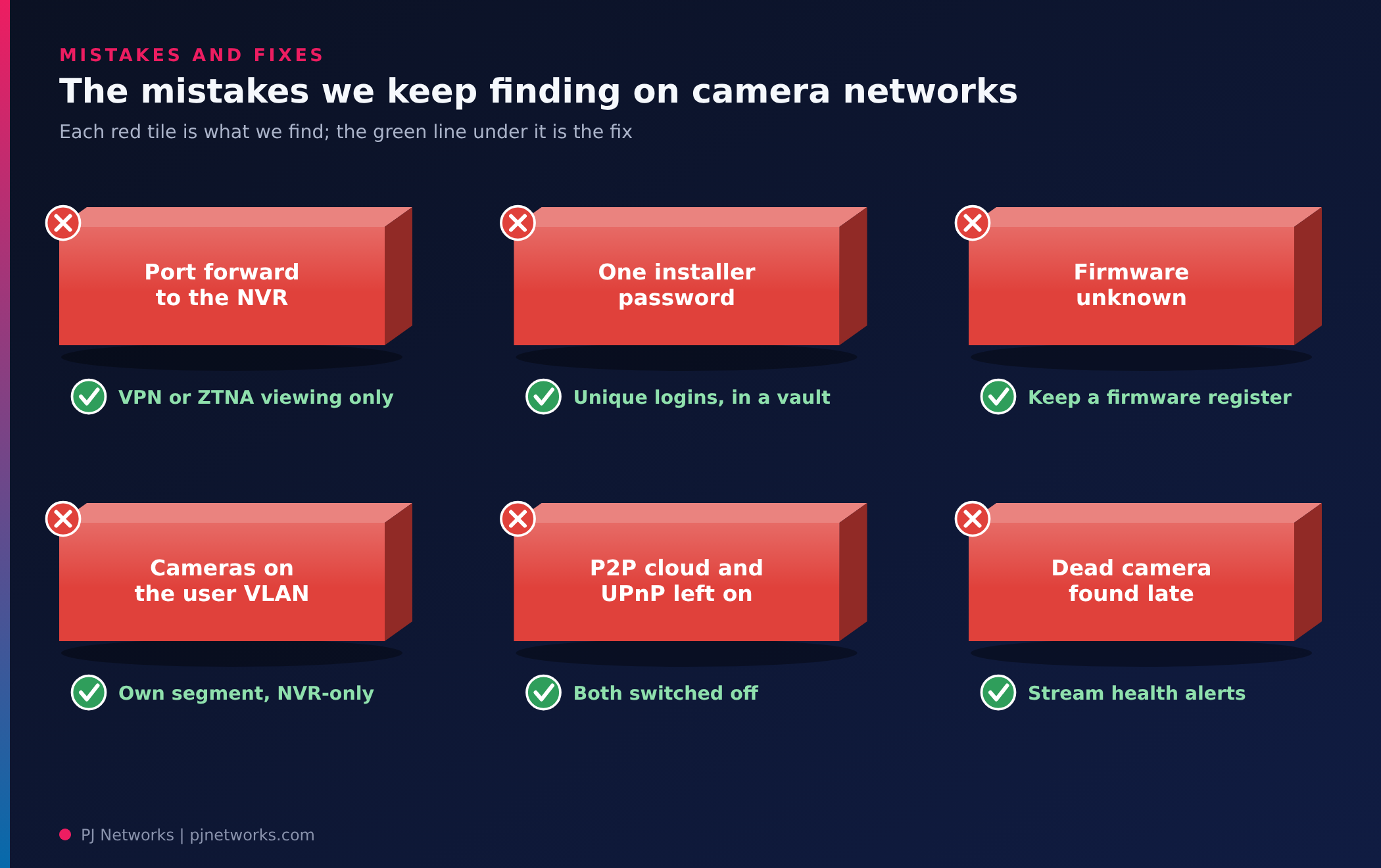
Somebody wanted to watch the warehouse from a phone, so the installer forwarded the recorder’s web port on the branch router, or switched on the vendor’s peer-to-peer cloud feature. Either way the device now answers to the internet. Search engines that index exposed devices find it within days, and so do scanning botnets.
The installer used the same admin password at all twelve sites because it made support calls easier. Or the firmware is the version that shipped in the box four years ago. Entry rarely needs anything clever.
Once inside, the attacker has a Linux box that nobody runs antivirus on and nobody logs in to. It can join a DDoS botnet, which is the noisy outcome. The quieter one is worse: the camera sits on the same VLAN as desktops, so it becomes a scanning point towards file servers and domain controllers. MITRE’s ATT&CK knowledge base files this kind of step under discovery and lateral movement, and it looks exactly like the techniques we cover in our piece on spotting lateral movement in logs you already keep. At the end of the path, the attacker can also blind a camera at the moment it matters, which is its own kind of damage.
We start every camera review at the edge, because closing the front door costs almost nothing and removes most of the risk. Here is the order we follow on a site visit.
The fourth step is where it usually goes wrong. Facilities teams can tell you how many cameras a site has, but rarely what firmware they run, and the installer’s AMC contract almost never covers firmware updates. Ask for that clause at the next renewal. If the vendor won’t commit to updates, at least get the camera admin credentials handed over to you.
Remote viewing also needs the same care as any other remote access. If guards or managers log in from home, the account protections from our guide to stopping VPN brute force attacks apply here just as much.
Patching cameras is slow and some models will never get another update. Segmentation is the control that still works when a camera is compromised, because it limits what the camera can reach. We’d put this ahead of almost everything else on the list.
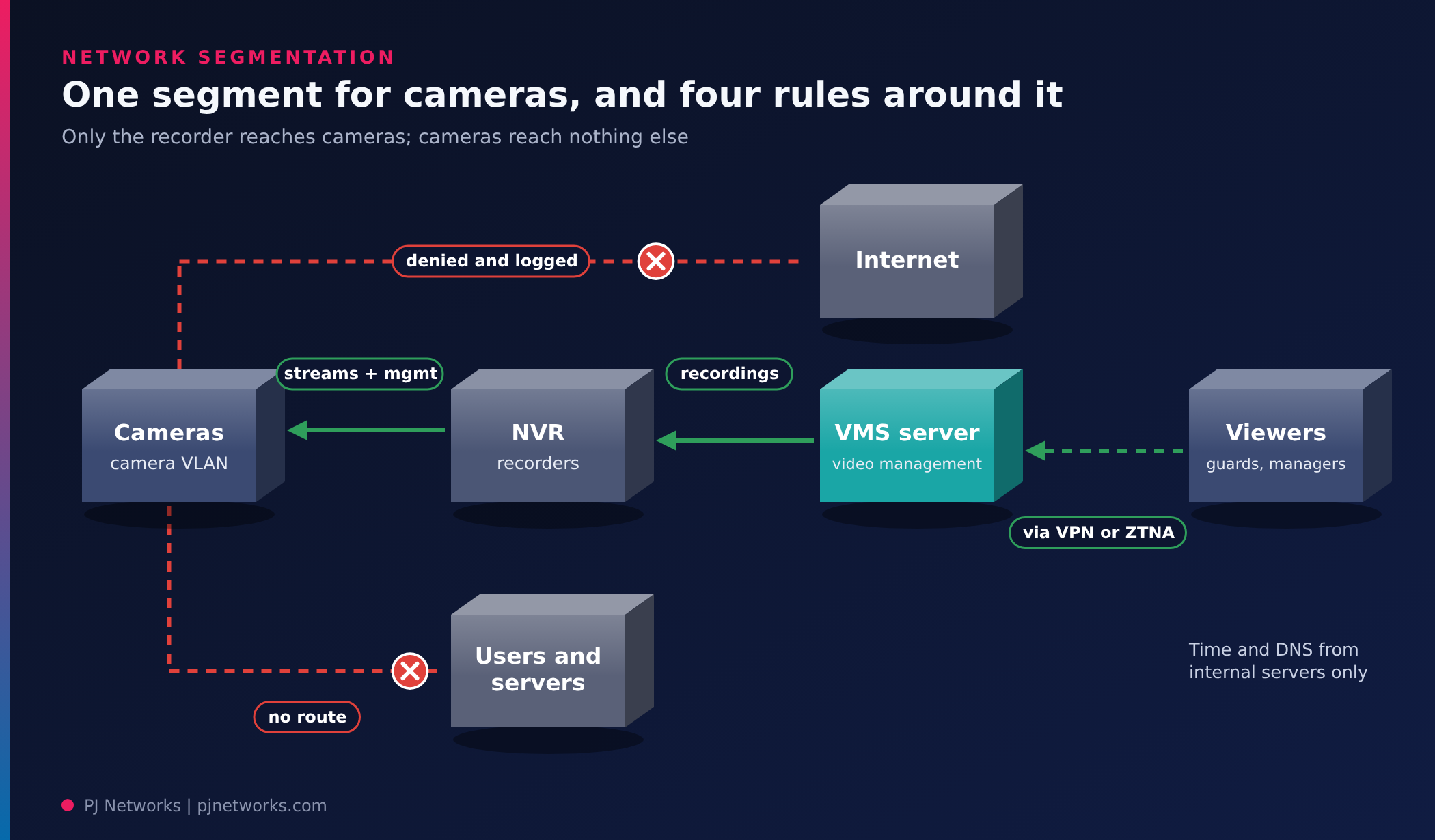
The rules we write are short. Cameras live in their own VLAN with no route to user networks. Only the recorder (NVR) can open connections to cameras, for streams and management. The video management server talks to the recorders, and viewing clients talk to the video management server, not to cameras. Cameras get time and name resolution from internal servers. Outbound internet from the camera VLAN is denied, and that deny rule is logged.
That last point carries more weight than it seems. A camera has almost no legitimate reason to reach the internet. So a logged deny on the camera VLAN is one of the cleanest alerts you’ll ever get: very little noise, and when it fires, something has changed on that device.
Picture a 300-camera logistics hub near Bhiwandi with one network engineer. Re-addressing every camera into a new subnet over a weekend isn’t realistic. A workable compromise is to move the recorders and video server first, then shift cameras switch by switch, with a temporary rule that lets the old subnet reach only the new recorders. It’s untidy for a few weeks. It’s still far better than a flat network forever.
Whatever firewall you run, this is ordinary zone or interface policy. FortiGate, Palo Alto, Check Point and Sophos all do it well. What none of them do on their own is tell you whether the camera behind the rule is still recording, which is the next problem.
Most organisations find out a camera was dead when they go looking for footage after an incident. By then the recorder shows a black window for the hour they need. Health monitoring is not a security luxury here. It’s the evidence side of the same problem.
These are the signals we want from the camera estate, and where each one comes from:
| Signal | Source | What it usually means |
|---|---|---|
| Logged deny from camera VLAN to the internet | Firewall traffic log | Firmware phoning home, P2P feature still on, or a compromised device |
| DNS lookups from cameras for unknown domains | Internal DNS server logs | Same as above, often seen before the firewall deny |
| Failed logins on the recorder web interface | NVR syslog, where the model supports it | Password guessing, or a guard with the wrong credentials |
| Stream lost or frame rate dropped | Recorder status, stream health checks | Cable, PoE, power or a tampered camera |
| Camera reachable on a new service | Periodic scan of the camera VLAN | Firmware change or an unauthorised configuration |
| Switch port flaps on a camera port | Switch syslog and SNMP | Physical tampering, failing PoE budget or cabling |
Keep these logs as long as you keep the rest. CERT-In’s 2022 directions expect logs of ICT systems to be kept within India for a rolling 180 days, and we’ve written separately about how we plan firewall log retention in India. Cameras and recorders are ICT systems too, and they are often the ones missing from the log inventory.
One honest trade-off before the checklist. Some older cameras will never be safe: no firmware updates, a fixed password, a web interface you can’t turn off. You can isolate them hard, or you can replace them. Isolation buys time cheaply. Replacement costs lakhs at a large site, so budget for it across two or three financial years, worst sites first.
For new purchases, MeitY’s Essential Requirements for CCTV route internet-connected cameras through testing and certification under STQC, including testing for vulnerabilities that could allow unauthorised remote access. Ask your supplier for the certificate of the exact model on the purchase order. Treat it as a floor, though. Certification at the time of sale says nothing about a device that has run unpatched for three years, or one sitting on a flat network.
Here is the stage-by-stage checklist we hand to clients. Each control has a named owner, because unowned controls are what got the cameras into this state.
| Attack stage | Control that breaks it | Owner |
|---|---|---|
| Find | No port forwards, UPnP and P2P off, quarterly external exposure check | Network team |
| Enter | Unique admin passwords in a vault, firmware register, update clause in the AMC | Facilities with IT |
| Settle | Internet denied from camera VLAN, deny rule logged and alerted | Network team |
| Move | Camera VLAN with no route to users or servers; only the NVR reaches cameras | Network and security |
| Use | Stream health monitoring, coverage reports, alerts on lost streams | Security with facilities |
The checklist above works with any firewall. The part most stacks leave to manual effort is the last row: knowing, every hour, which cameras are recording and which have gone quiet, across brands and sites. That’s the gap the PrahiX camera monitoring system, the video surveillance (VMS) layer of PrahiX Ora, fills. Ora is a unified SecOps platform built by PrahiX Tech Pvt Ltd; it’s the platform we deploy and operate for clients, and our PrahiX Ora video analytics page covers how we roll it out. Your existing cameras, recorders and firewalls stay where they are.
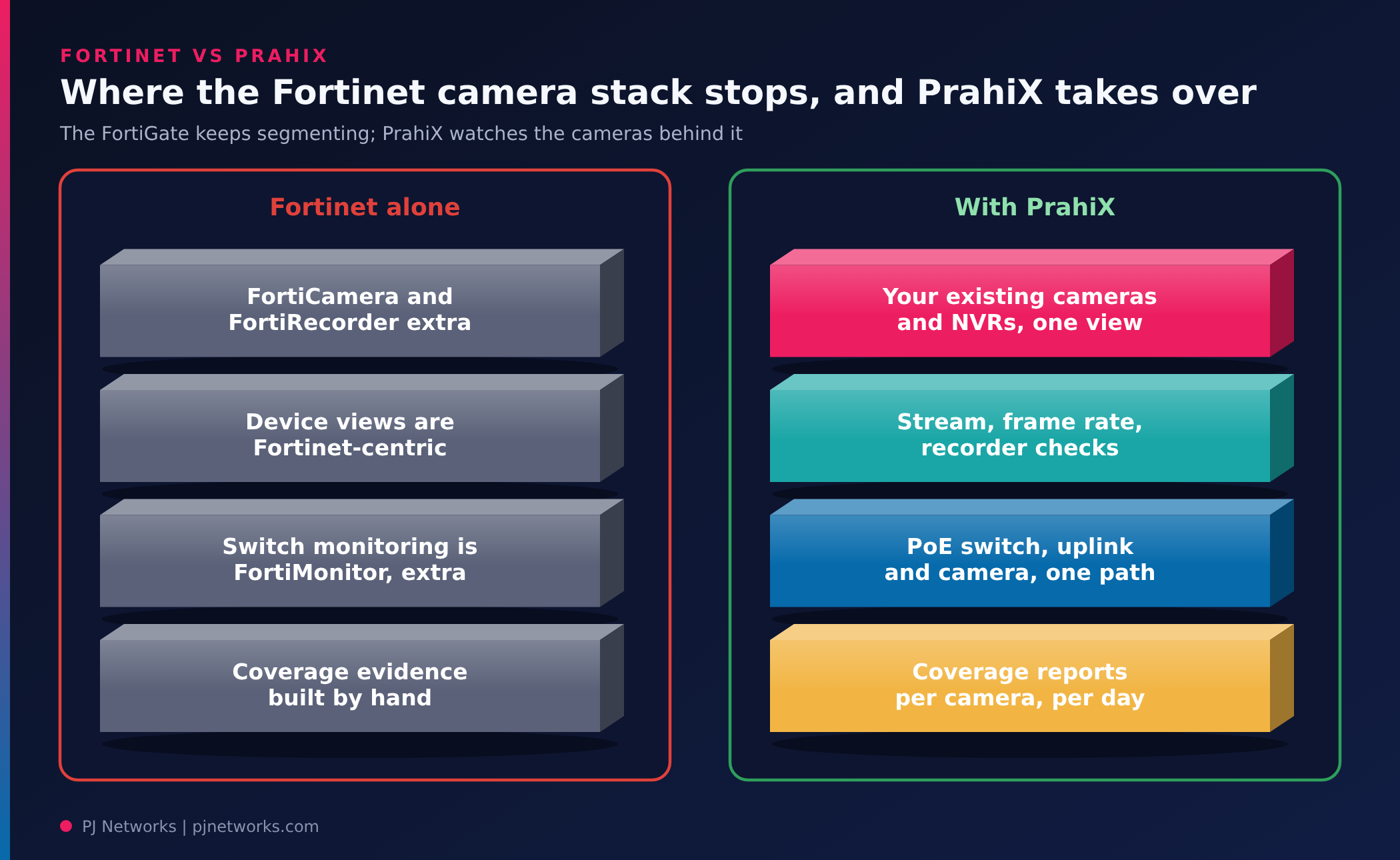
Fortinet does the network half of this well. A FortiGate will segment the camera VLAN cleanly, log every denied connection and block known-bad destinations. The limits show up when you need the camera half.
| With Fortinet alone | With PrahiX |
|---|---|
| Video management needs FortiCamera and FortiRecorder, separate products, and your installed cameras are usually another brand | The cameras, NVRs and access controllers you already own, across sites, in one view: ONVIF, RTSP, Hikvision, Dahua and other IP cameras |
| FortiManager and FortiAnalyzer are built around Fortinet devices (FortiGate, FortiSwitch, FortiAP), so third-party recorders sit outside their device views | Continuous health checks on reachability, stream availability, frame rate and recorder status, so a dead camera becomes a ticket |
| Multi-vendor monitoring of the switches feeding cameras is FortiMonitor, a separate product | PrahiX Uni’s agentless diagnostics show the PoE switch, uplink and camera on one path, with config snapshots and diffs |
| A full SOC view of camera-subnet traffic means FortiSIEM, another product and licence | Camera-VLAN denies and DNS anomalies correlated beside other security signals on the same platform |
| Coverage evidence for an incident or audit is assembled by hand from recorder screens | Coverage reports that answer “was this camera working on the 14th?”, with video and access control on one timeline |
This isn’t a Fortinet weakness. Every major security vendor builds for its own devices or its own agent, and cameras are neither. The pattern holds across the stacks we operate.
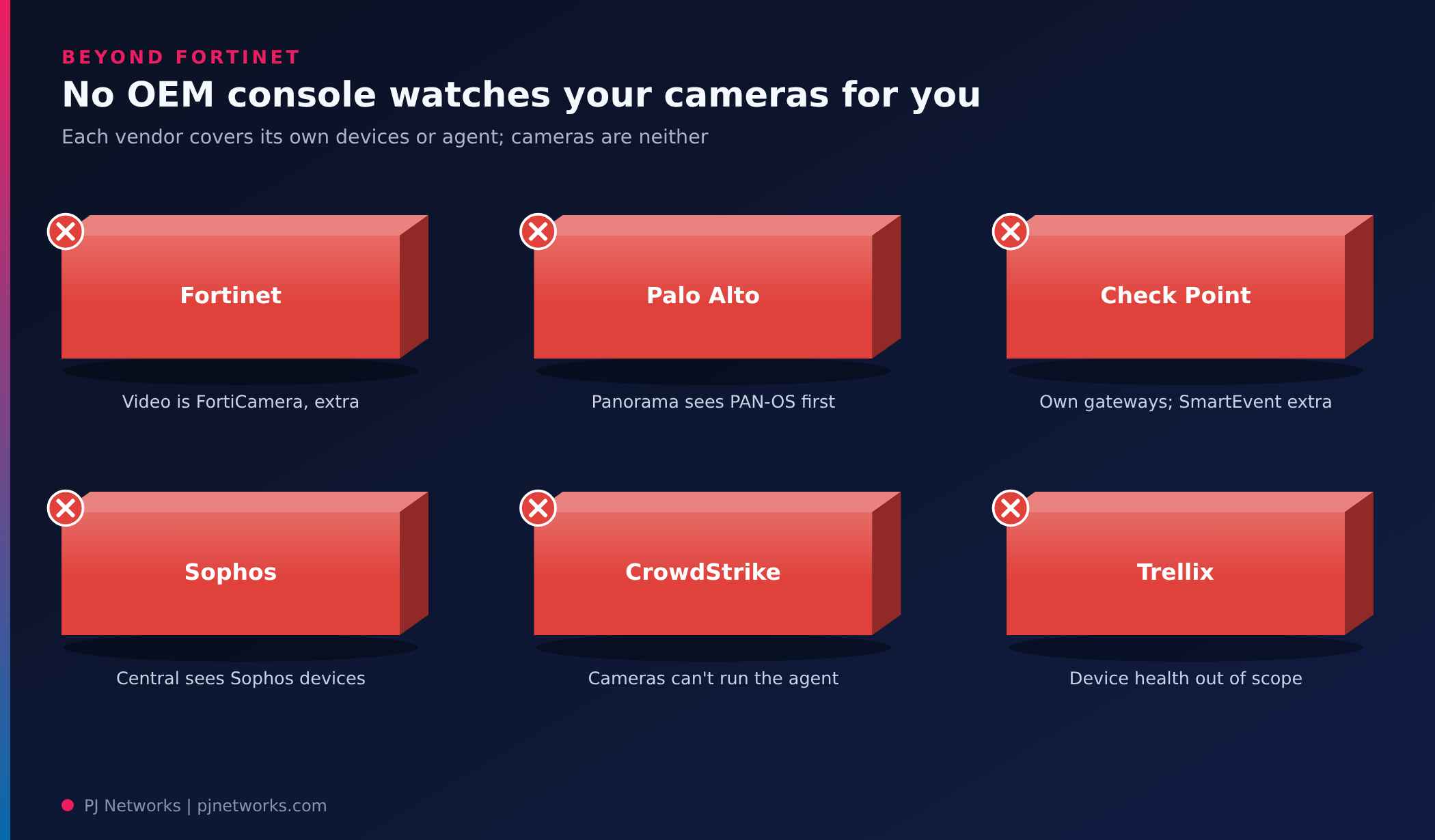
| OEM | What you get, and where it stops |
|---|---|
| Fortinet | Strong segmentation and logging on FortiGate; video needs FortiCamera and FortiRecorder, and multi-vendor monitoring is FortiMonitor, each separate |
| Palo Alto Networks | Panorama manages and logs PAN-OS firewalls; switches, recorders and other vendors’ devices need another tool, and Cortex XSIAM is a separate product |
| Check Point | Security Management and SmartConsole manage Check Point gateways; SmartEvent correlation is a separately licensed blade |
| Sophos | Sophos Central manages Sophos firewalls, switches, APs and endpoints; third-party sources for XDR need integration licences |
| CrowdStrike | Falcon is agent-based; cameras and recorders cannot run the agent, and network device health is outside its scope |
| Trellix | ePO manages Trellix agents and products; network device health is outside its scope |
| PrahiX | Watches cameras, recorders, access controllers and the network beneath them in one place, alongside whichever firewalls and EDR you already run |
Earlier we said most teams discover a dead camera after an incident. On the PrahiX camera monitoring system, each camera is checked continuously for reachability, stream availability, frame rate and recorder status. When a stream drops, a ticket opens with the site and camera named, and because PrahiX Uni monitors the switch too, the ticket can show whether the PoE port flapped or the uplink went down. Streams reach the console with under one second of latency, so guards aren’t watching a stale picture.

When something happens at a gate or a server room, the questions come fast: which camera covered it, was it recording, who badged in. The system puts video and access control on one timeline, and its coverage reports show the health history of each camera for the day in question. AI analytics run on the cameras you already have, including face recognition, ANPR, behaviour analytics, PPE compliance, perimeter protection and visitor analytics, so a perimeter breach at 2 a.m. raises an alert rather than waiting for someone to scrub footage. More detail is on the PrahiX camera monitoring system page.
PrahiX Uni brings the camera VLAN’s firewall logs, DNS and switch telemetry into its SIEM and SOAR engine, with Sigma-based detections mapped to MITRE ATT&CK and logs kept 180 days. RAYA AI links a lost stream to the failed switch port or the suspicious outbound connection, writes the incident narrative and sends a morning summary of cameras that went quiet overnight. PrahiX Data Protection matters where footage and visitor records count as personal data under the DPDP Act, through its consent ledger and breach clocks. PrahiX Guest keeps visitor Wi-Fi off the camera network, on its own portal and record.
Yes. A separate VLAN with firewall rules between it and everything else is the single most useful control. Allow only the recorder to reach cameras, deny camera internet access, and log the denies. A VLAN with no firewall policy between zones only separates broadcast traffic, so it protects very little on its own.
It can be, if the app connects through your VPN or ZTNA to the video management server. The risky versions are port forwards on the router and the vendor’s peer-to-peer cloud relay, which expose recorders without your firewall’s say. If guards need mobile access, give them named accounts with view-only rights and multi-factor sign-in.
Review the firmware register every quarter and whenever the vendor or CERT-In publishes a camera advisory. Test an update on one camera per model first, because some firmware releases reset settings or break recorder integration. Devices that no longer receive updates should be isolated more tightly and placed on a replacement plan.
It means the model passed testing against MeitY’s Essential Requirements at certification time, which is a sensible minimum for new purchases. It doesn’t cover how the camera is installed, what password it runs with, whether it’s patched later or which network it sits on. Those remain your controls.
Add a logged deny rule for outbound internet traffic from your camera subnets at one site, leave it for seven days, and read what it catches. The list of cameras trying to phone home tells you more about your CCTV camera network security than any audit questionnaire will.
If you’d like a second pair of eyes, our team reviews camera segmentation as part of our OT and IoT security work, and we can run the PrahiX camera monitoring system alongside the cameras you already have. A short call is usually enough to tell whether your sites need re-architecture or just a firmer set of rules.